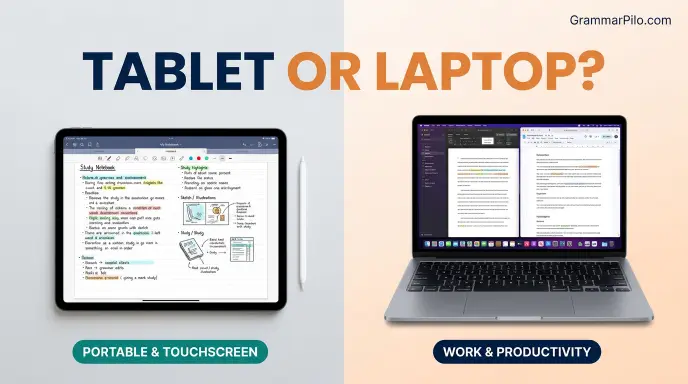
A tablet and a laptop are both useful portable computing devices, but they are designed for different needs.
A tablet is generally better for portability, touchscreen activities, reading, drawing, and casual entertainment, while a laptop is usually better for typing, multitasking, professional work, and complex software.
Although modern tablets can perform many tasks traditionally associated with laptops, their operating systems, keyboards, and software capabilities can make a difference.
People often compare laptop or tablet when choosing a device for school, university, office work, travel, or personal use. Both options can browse the internet, stream videos, attend online meetings, and run everyday applications.
However, they offer different experiences when it comes to productivity, performance, battery life, storage, and flexibility.The right choice depends on how you plan to use your device.
A student who reads digital textbooks and takes handwritten notes may prefer a tablet, while a professional who works with spreadsheets, documents, and multiple applications may benefit more from a laptop.
This guide compares tablets and laptops to help you understand their features, advantages, disadvantages, and practical uses.
Tablet or Laptop: Quick Answer
A tablet is usually the better choice for portability, touchscreen convenience, reading, drawing, and entertainment. A laptop is generally more suitable for productivity, advanced software, extended typing, and demanding professional tasks.
Choose a tablet if you want:
- A lightweight device for travel and everyday use.
- A touchscreen for browsing, reading, and drawing.
- Convenient handwritten notes with a stylus.
- A device for watching videos and playing casual games.
- A simple option for basic internet activities.
Choose a laptop if you need:
- A physical keyboard and traditional computer experience.
- Better support for multitasking and desktop applications.
- A practical device for office and academic work.
- More flexibility for programming, editing, and professional software.
- Easier file management and peripheral connections.
Overall: A tablet is ideal for portable, touch based activities, while a laptop is generally the more versatile productivity device.
What Is a Tablet?
A tablet is a portable computing device that usually features a touchscreen as its primary method of interaction. Most tablets are designed to be held in the hands or placed on a flat surface.
Unlike traditional laptops, tablets generally do not have a permanently attached physical keyboard. Users interact with them through touch gestures, an on screen keyboard, or optional accessories such as detachable keyboards and styluses.
Popular tablet operating systems include Apple’s iPadOS and Google’s Android. Some devices also run Windows or other specialized software.
Common Uses of a Tablet
Tablets are suitable for many everyday activities, including:
- Reading e books and digital documents.
- Watching movies and streaming videos.
- Browsing websites and social media.
- Attending online classes and video meetings.
- Taking handwritten notes.
- Drawing and digital illustration.
- Playing mobile games.
- Managing emails and simple documents.
Advantages of Tablets
1. Lightweight and Portable
Most tablets are thinner and lighter than traditional laptops. Their compact size makes them convenient for carrying in a backpack, handbag, or travel case.
2. Touchscreen Convenience
A touchscreen allows users to navigate applications, scroll through pages, zoom into images, and interact with content directly.
3. Excellent for Reading and Entertainment
Tablets are particularly comfortable for reading digital books, watching videos, viewing photographs, and browsing websites.
4. Stylus Support
Many tablets support digital pens that allow users to write notes, draw illustrations, annotate documents, and create artwork.
5. Simple Everyday Experience
Tablet interfaces are often designed around straightforward touch based interactions, making basic activities accessible to many users.
Disadvantages of Tablets
Despite their convenience, tablets have some limitations.
- Typing long documents can be less comfortable without an external keyboard.
- Some professional desktop applications are unavailable or have limited tablet versions.
- Multitasking may be less flexible on certain operating systems.
- External ports and hardware connections can be limited.
- Accessories such as keyboards, styluses, and protective cases may increase the total cost.
What Is a Laptop?
A laptop is a portable personal computer with an integrated screen, physical keyboard, touchpad, battery, and internal computing hardware.
Unlike a typical tablet, a laptop is designed to provide a traditional desktop style computing experience in a portable form. Most laptops run Windows, macOS, ChromeOS, or Linux.
They are commonly used for education, professional work, programming, content creation, business operations, and entertainment.
Common Uses of a Laptop
Laptops support a wide range of activities, such as:
- Writing reports, assignments, and presentations.
- Managing spreadsheets and databases.
- Programming and software development.
- Editing photographs and videos.
- Designing graphics and websites.
- Attending online meetings.
- Browsing the internet.
- Playing computer games.
- Running professional desktop applications.
Advantages of Laptops
1. Physical Keyboard
A built in keyboard makes laptops more comfortable for writing long documents, entering data, sending emails, and completing assignments.
2. Better Productivity
Laptops generally provide a more flexible environment for multitasking, allowing users to work with several applications and windows.
3. Desktop Software Support
Many laptops can run full versions of professional applications used in business, education, programming, engineering, and creative work.
4. More Connection Options
Depending on the model, laptops may include USB ports, HDMI, audio connections, memory card readers, and other useful interfaces.
5. Greater Hardware Flexibility
Some laptops allow users to upgrade or replace components such as storage and memory, although this depends on the model.
Disadvantages of Laptops
Laptops also have drawbacks.
- They are generally heavier than tablets.
- They may take up more space in a bag.
- Touchscreen interaction is not available on every model.
- Some powerful laptops have shorter battery life under heavy workloads.
- Repairs and hardware upgrades can be expensive.
The Origin and History of Tablets and Laptops
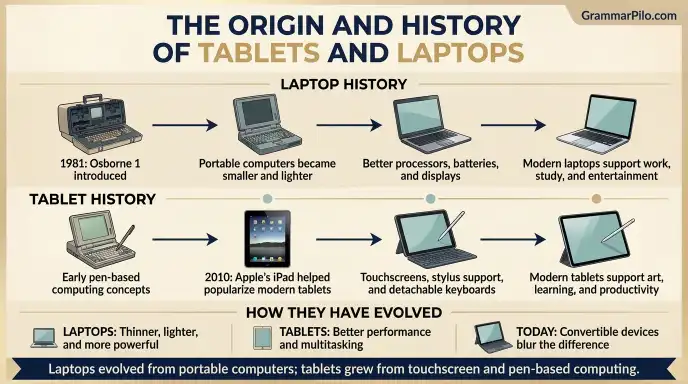
Tablets and laptops developed from different stages of personal computing. Their histories explain why they have different designs and interaction methods.
Where Did Laptops Come From?
The development of portable computers began before modern laptops became common. Early portable machines were often large, heavy, and less convenient than today’s devices.
One influential early portable computer was the Osborne 1, introduced in 1981. It was designed to make computing more portable, although its size and weight were very different from modern laptops.
During the following decades, portable computers became smaller, lighter, and more powerful. Improvements in processors, batteries, screens, and storage helped create the laptop designs people use today.
Modern laptops can perform tasks that once required large desktop computers, making them important tools for education, business, entertainment, and professional work.
Where Did Tablets Come From?
The idea of a portable computer operated through a screen or pen based input appeared in early computing concepts long before modern touchscreen tablets became popular.
Pen based computers and tablet style devices developed throughout the late twentieth century. However, the launch of Apple’s iPad in 2010 helped establish the modern consumer tablet market.
Since then, manufacturers have introduced tablets with faster processors, better displays, stylus support, detachable keyboards, and advanced multitasking features.
Today, tablets are used for education, digital art, communication, entertainment, and professional activities.
How Have Tablets and Laptops Changed?
Both device categories have become more capable over time.
Laptops have become thinner, lighter, and more energy efficient. Many now feature touchscreens, convertible hinges, and tablet style designs.
Tablets have gained more powerful processors, improved keyboards, desktop like multitasking features, and support for professional applications.
The distinction between the two devices is less rigid than it once was, particularly with detachable and convertible models.
Laptop vs. Tablet: Key Differences
Although tablets and laptops can perform many similar tasks, their hardware and user experiences differ.
| Feature | Tablet | Laptop |
| Main input | Touchscreen | Keyboard and touchpad |
| Portability | Usually lighter | Usually heavier |
| Keyboard | Often optional | Built in |
| Screen interaction | Touch based | Usually non touch, depending on model |
| Operating systems | iPadOS, Android, Windows | Windows, macOS, ChromeOS, Linux |
| Multitasking | Varies by device | Generally more flexible |
| Professional software | Varies by platform | Broad desktop software support |
| Drawing | Often excellent with stylus | Depends on touchscreen and pen support |
| File management | Can be more limited | Generally more flexible |
| Gaming | Mobile and cloud games | Mobile, PC, and demanding games, depending on hardware |
| Battery life | Often strong for everyday use | Varies by model and workload |
| Upgrade options | Usually limited | Available on some models |
Performance: Is a Tablet or Laptop More Powerful?
Performance depends on the processor, memory, storage, cooling system, and operating system rather than simply the device category.
Some modern tablets have powerful processors that can handle demanding creative applications, multitasking, and high quality games. Similarly, lightweight laptops can perform everyday tasks efficiently without requiring expensive hardware.
However, laptops generally offer a wider selection of configurations, particularly for users who need powerful processors, dedicated graphics, large memory capacities, or specialized professional software.
Tablet Performance
A modern tablet can comfortably handle many everyday activities, including:
- Web browsing.
- Video streaming.
- Online classes.
- Digital note taking.
- Document editing.
- Photo editing.
- Casual gaming.
High end tablets can also support advanced illustration, video editing, and other demanding creative work.
Laptop Performance
Laptops are available in a broader range of performance levels. Basic models can handle everyday computing, while powerful workstations and gaming laptops can support demanding workloads.
They are particularly useful for:
- Software development.
- Large spreadsheets.
- Advanced video editing.
- Professional design applications.
- Engineering software.
- Computer gaming.
Performance verdict: Laptops generally offer more flexibility for demanding computing tasks, but premium tablets can be powerful enough for many professional workflows.
Portability and Design: Tablet or Laptop?
Portability is one of the biggest differences between these devices.
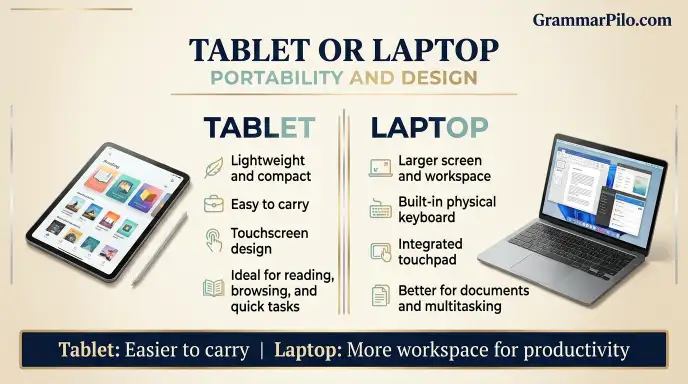
Why Tablets Are Easier to Carry
Tablets are usually compact, lightweight, and designed for handheld use. Many models can be carried comfortably throughout the day.
Their touchscreen design also makes them convenient for quick activities such as reading, checking emails, viewing documents, and browsing websites.
Why Laptops Offer More Workspace
Laptops are generally larger because they include a physical keyboard and integrated touchpad. Their screens may also provide more room for working with multiple windows.
This additional space can improve productivity, particularly when handling documents, spreadsheets, and professional applications.
Portability verdict: Tablets are generally better for lightweight travel, while laptops provide a more complete working environment.
Battery Life: Which Device Lasts Longer?
Battery life varies significantly between models, display settings, processor workloads, and software.
Tablets often provide strong battery performance during everyday activities because their hardware and operating systems are designed for mobile efficiency.
Laptops can also offer excellent battery life, especially lightweight models designed for office work and travel. However, gaming, video editing, and other demanding tasks can reduce battery runtime considerably.
Tablet Battery Life
Tablets are often suitable for extended reading, browsing, video streaming, and note taking sessions without frequent charging.
Laptop Battery Life
Laptop battery performance depends heavily on the hardware. Lightweight productivity models may last many hours, while powerful gaming and workstation laptops can consume more energy.
Battery verdict: Many tablets offer excellent everyday battery life, but a carefully selected laptop can also provide long lasting performance.
Tablet or Laptop for Students?
Students often compare tablets and laptops because both devices can support learning, research, assignments, and online classes.
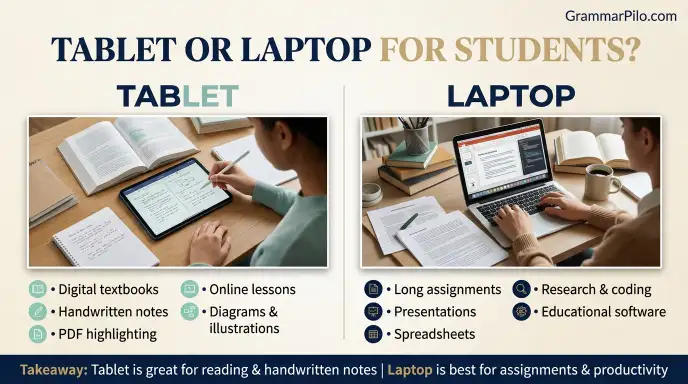
The better choice depends on the subject, educational requirements, and type of assignments.
Why Students May Prefer a Tablet
A tablet can be useful for:
- Reading digital textbooks.
- Highlighting PDF documents.
- Taking handwritten notes.
- Watching educational videos.
- Attending online lessons.
- Drawing diagrams and illustrations.
A stylus can be particularly helpful for students who prefer writing notes by hand.
Why Students May Prefer a Laptop
A laptop is often more practical for:
- Writing lengthy assignments.
- Creating presentations.
- Working with spreadsheets.
- Researching through multiple browser tabs.
- Programming and coding.
- Using desktop educational software.
Which Is Better for Students?
A tablet may be ideal for reading, handwritten notes, and visual learning. A laptop is generally a safer choice when students need to complete extensive typing, use specialized software, or submit complex assignments.
For many university students, a laptop is the more versatile primary device, while a tablet can serve as a useful companion.
Tablet or Laptop for Work and Business?
Professionals need devices that support communication, productivity, file management, and specialized applications.
Tablet for Work
A tablet can be useful for:
- Checking emails.
- Joining video meetings.
- Reviewing documents.
- Presenting information.
- Taking meeting notes.
- Signing digital documents.
- Managing simple business tasks.
Its lightweight design makes it convenient for professionals who travel frequently or attend meetings throughout the day.
Laptop for Work
A laptop is generally more suitable for:
- Preparing reports.
- Managing business spreadsheets.
- Creating presentations.
- Working with multiple applications.
- Managing large files.
- Using professional software.
- Handling complex administrative tasks.
Which Is Better for Business?
A laptop is usually the better primary device for office employees, freelancers, managers, and professionals who spend significant time creating or editing content.
A tablet can be an excellent secondary device for meetings, travel, presentations, and quick tasks.
Tablet or Laptop for Gaming and Entertainment?
Both devices support entertainment, but their gaming experiences are different.
Gaming on a Tablet
Tablets are suitable for mobile games, casual gaming, cloud gaming services, and supported controller based experiences.
Their touchscreen displays can make simple games convenient to play, while larger screens provide an enjoyable viewing experience.
Gaming on a Laptop
Laptops offer access to a much broader PC gaming ecosystem. Depending on their hardware, they can run demanding games, support external controllers, and connect to gaming accessories.
Gaming laptops with dedicated graphics cards are designed for more intensive gaming experiences.
Entertainment Comparison
For watching videos, reading, browsing, and casual gaming, a tablet is often convenient.
For PC gaming, advanced game settings, and a wider range of computer games, a suitable laptop is generally the better option.
Gaming verdict: Tablets are excellent for mobile entertainment, while gaming laptops offer more options for demanding PC games.
Tablet or Laptop for Drawing and Creative Work?
Creative users may benefit from either device, but their strengths differ.
Drawing on a Tablet
Many tablets support pressure sensitive styluses and specialized drawing applications. This makes them attractive to illustrators, students, designers, and digital artists.
The ability to draw directly on the screen provides a natural experience that resembles working with paper.
Creative Work on a Laptop
Laptops can support advanced design, video editing, animation, photography, and professional publishing applications.
Artists can also connect drawing tablets, pen displays, external monitors, and other creative equipment.
Which Is Better for Creators?
A tablet may be more convenient for sketching, handwriting, and direct screen drawing.
A laptop is generally more flexible for complex editing, large creative projects, file management, and professional production workflows.
Some creators use both devices to combine portability with advanced desktop software.
Cost of a Tablet vs. Laptop
The price of a laptop or tablet depends on the brand, hardware specifications, screen quality, storage, and additional features.
Basic tablets are often available at lower prices than many laptops. However, premium tablets can become expensive when accessories such as styluses, keyboards, and protective cases are included.
Laptops also cover a broad price range. Budget models are suitable for basic computing, while premium ultrabooks, gaming laptops, and professional workstations can cost considerably more.
What Affects Tablet Prices?
- Processor performance.
- Screen size and display quality.
- Internal storage.
- Cellular connectivity.
- Stylus compatibility.
- Keyboard accessories.
What Affects Laptop Prices?
- Processor generation and performance.
- RAM capacity.
- SSD storage.
- Graphics hardware.
- Display resolution and refresh rate.
- Build quality and battery capacity.
Cost verdict: Neither category is automatically cheaper. Compare the complete device and required accessories rather than the starting price alone.
Common Mistakes When Choosing a Tablet and Laptop
People sometimes choose a device based on appearance, brand popularity, or price without considering how they will use it.
Mistake 1: Assuming Every Tablet Can Replace a Laptop
Incorrect assumption: A tablet can perform every task that a laptop can perform.
Better understanding: Some tablets support advanced productivity, but software compatibility, multitasking, and file management can still differ.
Mistake 2: Buying a Laptop Only for Basic Browsing
Incorrect assumption: Everyone needs a powerful laptop for internet browsing and watching videos.
Better understanding: A basic tablet may be sufficient for people who mainly read, stream, browse, and use simple applications.
Mistake 3: Ignoring Keyboard Requirements
Incorrect assumption: A touchscreen keyboard is just as convenient as a physical keyboard for long documents.
Better understanding: A physical keyboard is usually more comfortable for extended typing.
Mistake 4: Comparing Devices Only by Price
Incorrect assumption: The cheapest device always provides the best value.
Better understanding: Consider performance, software support, accessories, battery life, and long term usefulness.
Mistake 5: Assuming All Laptops Are More Powerful Than All Tablets
Incorrect assumption: Every laptop performs better than every tablet.
Better understanding: High end tablets can outperform some entry level laptops in particular tasks. Actual specifications matter more than device labels.
Laptop and Tablet: Google Trends and Modern Usage
Search interest in tablets and laptops reflects changing technology habits, education needs, remote work, and entertainment preferences.
People often search for tablets when comparing touchscreen devices, digital note taking options, drawing tools, and portable entertainment. Laptop related searches frequently involve work, education, gaming, software compatibility, and productivity.
Interest in both categories can change when manufacturers release new devices or when students and professionals prepare for a new academic or business year.
A meaningful Google Trends comparison should use the same location and time period for both search terms. It is also useful to distinguish general searches for tablets and laptops from searches for specific brands, models, and operating systems.
Usage takeaway: Tablets and laptops remain important computing categories, but their popularity depends on changing user needs and product developments.
Frequently Asked Questions
1. Is a tablet or laptop better?
A laptop is generally better for productivity, advanced software, multitasking, and long typing sessions. A tablet is more suitable for portability, reading, drawing, and touchscreen activities.
2. Can a tablet replace a laptop?
A tablet can replace a laptop for basic browsing, reading, video calls, note taking, and some office tasks. However, users who need specialized desktop software or extensive multitasking may still require a laptop.
3. Is a tablet better than a laptop for students?
A tablet is useful for digital textbooks, handwritten notes, and educational videos. A laptop is usually more practical for assignments, presentations, research, programming, and specialized academic applications.
4. Which has better battery life, a tablet or laptop?
Many tablets offer excellent battery life for everyday activities. However, some modern laptops also provide long battery runtime. The actual result depends on the device and workload.
5. Is a tablet cheaper than a laptop?
Basic tablets are often less expensive than laptops, but premium tablets and their accessories can cost as much as or more than some laptops. Prices depend on specifications and brand.
6. Can you use Microsoft Office on a tablet?
Yes. Microsoft Office applications are available on many tablets, including supported iPad and Android devices. However, features and functionality can differ from desktop versions.
7. Which is better for traveling, a tablet or laptop?
A tablet is generally easier to carry because it is smaller and lighter. A laptop may be more useful for travelers who need to complete professional work, manage large files, or use desktop applications.
Conclusion: Should You Choose a Tablet or Laptop?
Choosing between a tablet and a laptop depends on your daily activities, work requirements, and preferred way of interacting with technology. Both devices offer useful features, but they are designed with different priorities.
A tablet is an excellent choice for people who value portability, touchscreen convenience, digital reading, entertainment, and handwritten notes. It is particularly useful for students, travelers, casual users, and digital artists who prefer working directly on a screen.
A laptop is generally the stronger option for people who need a physical keyboard, advanced multitasking, professional applications, programming tools, and a traditional computer environment. It is particularly practical for office workers, university students, freelancers, and content creators.
If you can afford only one device and need it for a wide range of tasks, a laptop is usually the more versatile option. However, if your activities mainly involve reading, browsing, streaming, and note taking, a tablet may be all you need.
Ultimately, the best device is the one that matches your actual requirements rather than the one with the most impressive specifications.
What to Read Next

I’m Claire Morgan, the author behind Grammarpilo.com, where I write about English grammar, sentence structure, punctuation, and everyday language. My goal is to make grammar simple, clear, and practical, helping readers understand the rules and apply them with confidence in real-world writing.







3 thoughts on “Tablet or Laptop: Which Device Is Better for Study & Everyday Use”