Choosing WordPress or Wix depends on how much control you want over your website and how much technical work you are willing to manage.
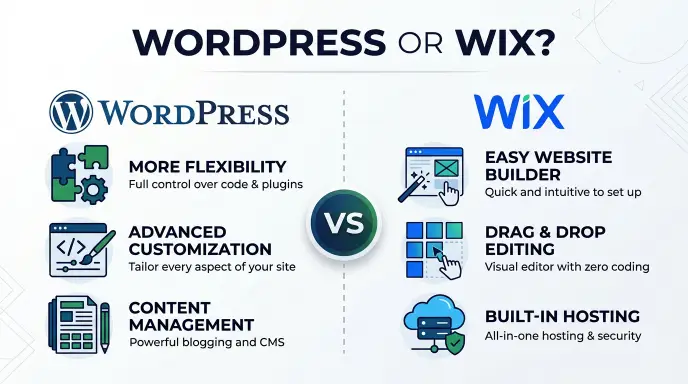
Wix is an all in one website builder that makes it easy to create and manage a website. WordPress offers greater flexibility, more customization options, and stronger control over how a website grows.
People often compare Wix vs. WordPress because both platforms help users build websites without needing advanced programming skills. However, they work in different ways. Wix includes hosting, security, and website management in one service.
WordPress gives users more freedom, especially when using the self hosted version, but requires additional decisions about hosting, themes, plugins, and maintenance.
Another important detail is that WordPress has two versions: WordPress.com and WordPress.org. These are not the same service, and confusing them can lead to an unfair comparison.
This guide explains their differences, including ease of use, design, pricing, blogging, search visibility, performance, and website ownership. It will help beginners, bloggers, business owners, and publishers choose the platform that best fits their goals.
WordPress or Wix: Quick Answer
WordPress is generally better for people who want flexibility, control, and room to build a large content based website. Wix is often better for beginners who want an easy website builder with hosting and maintenance included.
- Choose WordPress if you want extensive customization, a large plugin ecosystem, and greater control over your website.
- Choose Wix if you prefer drag and drop editing, built in features, and less technical maintenance.
- Choose WordPress.com if you want a hosted WordPress experience without managing your own server.
- Choose self hosted WordPress.org if you want the greatest control over hosting, files, and website functionality.
Neither platform automatically produces better search rankings. Content quality, website structure, speed, user experience, and technical setup matter more than the platform name.
What Does WordPress or Wix Mean?
Wix and WordPress are website building platforms, but they use different approaches.
What Is WordPress?
WordPress is an open source content management system (CMS). It allows users to create, edit, organize, and publish website content.
It started as a blogging platform in 2003 and developed into a system that can power blogs, business websites, online stores, membership sites, and large publishing websites.
WordPress offers thousands of themes and plugins that help users customize their websites.
There are two main ways to use it.
WordPress.org: This is the self hosted version. You download the free WordPress software and install it on a hosting service that you choose. You manage your hosting, themes, plugins, backups, and updates, although a managed hosting provider can handle many technical tasks.
WordPress.com: This is a hosted service. The company behind WordPress provides hosting and manages much of the technical infrastructure. Available features depend on the selected plan.
What Is Wix?
Wix is a hosted website builder that allows users to create websites through a visual editing system.
It is designed for people who want to build websites without handling separate hosting arrangements or installing website software.
Wix includes features such as:
- Drag and drop website editing.
- Ready made website templates.
- Built in hosting.
- Security and maintenance tools.
- Blogging features.
- Online store functionality.
- Business and marketing tools.
- An app marketplace for additional features.
Users can create a website, customize its appearance, and publish it through the Wix platform.
The Main Difference
WordPress gives users more control over the website’s structure and technical setup, especially in its self hosted version.
Wix combines website building, hosting, and management into one service.
This is the central difference between WordPress and Wix.
The Origin of WordPress and Wix
Understanding how these platforms started helps explain why their features and business models are different.
The History of WordPress
WordPress was launched in 2003 by Matt Mullenweg and Mike Little as an open source blogging platform.
Its original purpose was to make publishing online easier. Over time, developers created themes, plugins, and additional tools that expanded its capabilities.
WordPress eventually became a popular content management system used for many types of websites.
Its open source model allows developers around the world to contribute to its development and create tools for its users.
The History of Wix
Wix was founded in 2006 by Avishai Abrahami, Nadav Abrahami, and Giora Kaplan.
The company aimed to make website creation easier for people without programming experience.
Its visual website editor helped users build pages by selecting and arranging elements rather than writing code.
Wix later expanded its services to include online stores, booking systems, marketing tools, business features, and AI assisted website creation.
Why Their Development Matters
WordPress grew through an open source community and a large ecosystem of themes and plugins.
Wix developed as an integrated commercial platform where the company provides the editor, hosting, and many built in services.
These different foundations explain why WordPress offers more technical freedom while Wix emphasizes convenience.
British English vs. American English: WordPress or Wix
WordPress and Wix are brand names, not alternative spellings of the same word. Their names do not change between British and American English.
| British English | American English | Example |
| WordPress | WordPress | I built my website with WordPress. |
| Wix | Wix | Wix offers a visual website editor. |
| Website | Website | She created a new website. |
| Customisation | Customization | WordPress allows extensive customization. |
| Organisation | Organization | The organization manages its website. |
Regional Differences
The platform names remain identical in the United States, United Kingdom, Canada, Australia, and other English speaking regions.
However, spelling preferences can affect website content.
For example:
- British writing commonly uses “customisation.”
- American writing commonly uses “customization.”
- Both forms are correct in their respective varieties of English.
Publishing Preferences
When writing about these platforms:
- Use WordPress with a capital W and P.
- Use Wix with a capital W.
- Use WordPress vs. Wix for a direct comparison.
- Use WordPress or Wix when discussing which platform someone should choose.
There is no British or American spelling variation for either brand name.
WordPress vs. Wix: Main Features Compared
The platforms offer different levels of flexibility and convenience.
| Feature | WordPress.org | Wix |
| Website setup | Requires hosting and installation | Guided setup |
| Hosting | Purchased separately | Included |
| Website editor | Block editor and optional page builders | Visual drag and drop editor |
| Themes | Large theme ecosystem | Built in template library |
| Plugins and apps | Extensive plugin ecosystem | Wix App Market |
| Blogging | Advanced publishing capabilities | Built in blogging tools |
| Customization | Extensive control | More platform dependent |
| Maintenance | Managed by owner or hosting provider | Mostly managed by Wix |
| Website portability | Greater control over files and database | More limited platform portability |
| Online stores | WooCommerce and other options | Built in commerce tools |
| Technical knowledge | Some learning may be needed | Beginner friendly |
| Best suited for | Growing and content heavy websites | Simple websites and businesses |
Important: WordPress.com is different from self hosted WordPress.org. Its hosting, plugin access, and management features depend on the plan.
WordPress vs. Wix: Ease of Use
Ease of use is one of the biggest factors when choosing a website platform.
Is WordPress Easy to Use?
WordPress has a learning curve, especially for beginners using the self hosted version.
Users may need to learn how to:
- Choose a hosting provider.
- Install WordPress.
- Select and customize a theme.
- Install plugins.
- Create pages and blog posts.
- Configure website settings.
- Manage updates and backups.
The WordPress block editor makes writing and formatting content easier. Users can add headings, paragraphs, images, tables, and other blocks without coding.
Once someone understands the dashboard, publishing articles and managing a growing website becomes much easier.
Is Wix Easy to Use?
Wix is designed for people who want a simple website building experience.
Its visual editor allows users to add text, images, buttons, and other elements directly to a page.
Users can also start with templates and customize them to match their brand.
Wix handles hosting and much of the technical management, so beginners do not need to make as many separate decisions.
Which Is Easier?
Wix is generally easier for beginners because it combines the main website building tools in one place.
WordPress requires more initial learning, but it provides greater flexibility as a website becomes more complex.
WordPress vs. Wix: Design and Customization
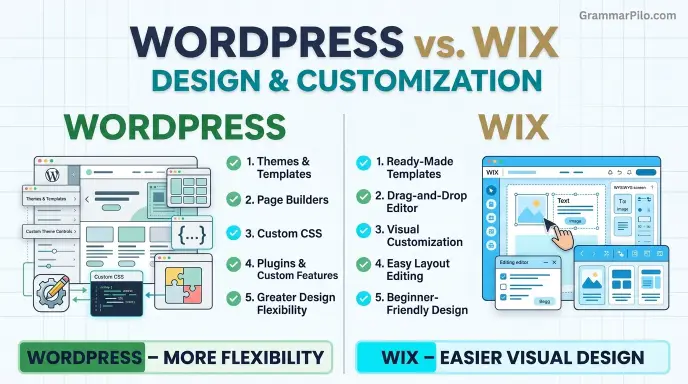
A website’s design affects its appearance, usability, and brand identity.
WordPress Design Options
WordPress provides a large collection of free and paid themes.
Users can customize their websites through:
- Block themes.
- Classic themes.
- Page builders.
- Custom CSS.
- Plugins.
- Custom templates.
- Developer created functionality.
This flexibility makes WordPress suitable for websites with unusual layouts or specific design requirements.
Users can also change themes as their website develops, although a theme change may require design adjustments.
Wix Design Options
Wix provides professionally designed templates for different website categories.
Users can customize layouts, fonts, colors, images, and other page elements through its visual editor.
Its design system is useful for people who want a polished website without working with code.
However, Wix websites are more closely tied to the platform’s editing system. Changing templates on an existing website is more restrictive than changing a WordPress theme.
Which Offers Better Customization?
WordPress offers greater overall customization because users can work with themes, plugins, code, and different hosting environments.
Wix offers an easier visual design experience, which may be enough for personal websites and small businesses.
WordPress vs. Wix: Pricing and Long Term Costs
The total cost of a website depends on more than its starting price.
WordPress.org software is free, but users need hosting and a domain. Some websites also require premium themes, plugins, security tools, or developer support.
Wix offers different subscription plans that bundle hosting and website features.
WordPress Costs
A self hosted WordPress website may involve:
- Domain registration.
- Web hosting.
- Premium themes.
- Paid plugins.
- Backup services.
- Security services.
- Developer assistance, if needed.
The actual cost depends on the hosting provider and the tools selected.
A small website may run with inexpensive hosting and free plugins. A large website with heavy traffic or advanced functionality may need a more powerful hosting plan.
Wix Costs
Wix uses subscription plans.
Depending on the plan and region, customers may receive:
- Website hosting.
- A custom domain connection.
- Storage and bandwidth allowances.
- Website building tools.
- Business features.
- Online payment options.
Some advanced features require higher priced plans.
A free Wix plan may be useful for testing the editor, but a professional website usually needs a paid plan and a custom domain.
Which Is Cheaper?
WordPress.org can be less expensive over time, especially when users choose affordable hosting and rely on free themes and plugins.
Wix may be easier to budget because hosting and many website tools are included in one subscription.
Always compare renewal prices, not just introductory offers.
WordPress vs. Wix: Search Visibility
Both WordPress and Wix can support websites that perform well in search engines.
The platform alone does not determine rankings. Website quality, useful content, technical setup, and user experience all matter.
Search Features in WordPress
WordPress offers extensive control over website structure and content.
Users can work with plugins such as Yoast SEO and Rank Math to manage:
- Page titles and descriptions.
- XML sitemaps.
- Canonical URLs.
- Schema markup.
- Redirects.
- Internal links.
- Content analysis.
Self hosted WordPress also gives users greater access to website files and technical settings.
This flexibility can be useful for publishers managing large collections of articles.
Search Features in Wix
Wix includes built in tools for managing important website settings.
Users can edit page titles, descriptions, URLs, and other search related elements.
Wix also provides sitemap functionality, structured data options, and connections to services such as Google Search Console.
These features make it possible to manage a website without installing several separate plugins.
Which Is Better for Search Rankings?
Neither platform automatically ranks higher.
WordPress provides more flexibility for advanced technical work, while Wix offers useful built in tools for people who prefer a simpler system.
A well managed Wix website can perform better than a poorly maintained WordPress website.
WordPress vs. Wix: Blogging and Content Management
Blogging is an important consideration for writers, publishers, and websites that depend on regular content.
Blogging With WordPress
WordPress was originally created for publishing, so blogging remains one of its strongest features.
It provides tools for:
- Organizing posts into categories.
- Adding tags.
- Creating custom post types.
- Managing authors.
- Scheduling articles.
- Editing content.
- Building internal links.
- Creating custom publishing layouts.
Plugins can extend the publishing system with additional features.
WordPress is especially useful for websites that publish many articles or need a structured content library.
Blogging With Wix
Wix includes a built in blogging system.
Users can create posts, organize content, add images, and manage their blog through the Wix dashboard.
It is suitable for personal blogs, business updates, and smaller publishing projects.
However, websites with complex content structures may find WordPress more flexible.
Which Is Better for Blogging?
WordPress is generally the stronger option for large blogs and content heavy websites.
Wix is a practical choice for people who want a simple blog connected to a business or personal website.
WordPress vs. Wix: Performance and Website Speed
Website speed affects how quickly visitors can access content and interact with a page.
However, neither platform guarantees a fast website.
WordPress Performance
WordPress performance depends on several factors:
- Hosting quality.
- Theme design.
- Plugin selection.
- Image sizes.
- Caching.
- Database performance.
- Content delivery networks.
A lightweight WordPress website with good hosting can load quickly.
However, too many poorly optimized plugins or an overloaded theme can slow it down.
Wix Performance
Wix manages hosting and much of its technical infrastructure.
It includes performance related features such as content delivery infrastructure and image optimization tools.
This reduces the amount of server management required from website owners.
However, design choices, large images, animations, and third party apps can still affect loading times.
Which Is Faster?
There is no universal winner.
Wix handles much of the technical performance work automatically. WordPress gives users more control over optimization, but the result depends heavily on hosting and configuration.
Measure actual page performance instead of assuming that one platform is always faster.
WordPress vs. Wix: Common Mistakes
People sometimes misunderstand the differences between these platforms.
Mistake 1: Thinking WordPress.org and WordPress.com Are the Same
Incorrect: WordPress.com and WordPress.org offer exactly the same hosting and management experience.
Correct: WordPress.org provides self hosted software, while WordPress.com is a hosted service with plan based features.
Explanation: The distinction affects costs, maintenance, customization, and control.
Memory tip: WordPress.org means you arrange hosting. WordPress.com provides hosted plans.
Mistake 2: Assuming Wix Cannot Rank on Google
Incorrect: Wix websites cannot appear in Google search results.
Correct: Wix websites can be indexed and rank in search engines.
Explanation: Search performance depends on content, technical setup, relevance, and user experience.
Memory tip: A website builder does not guarantee rankings.
Mistake 3: Assuming WordPress Is Completely Free
Incorrect: Running a WordPress website never costs money.
Correct: WordPress.org software is free, but hosting, domains, and optional services may cost money.
Explanation: The software itself is only one part of the total website expense.
Memory tip: Free software does not mean a free website.
Mistake 4: Choosing a Platform Only Because It Looks Better
Incorrect: The platform with the most attractive templates is always the best choice.
Correct: A good platform should also support the website’s content, features, growth, and maintenance needs.
Explanation: A beautiful website can still be difficult to manage if the platform does not support its long term goals.
Memory tip: Choose for long term needs, not appearance alone.
Everyday Examples: When to Use WordPress or Wix
Different website projects need different tools.
Personal Website
Someone wants a simple portfolio to display photographs, contact information, and a short biography.
Wix may be a good choice because its visual editor makes it easy to build attractive pages without managing hosting separately.
WordPress is also suitable if the person wants more customization.
Business Website
A small company needs a homepage, service pages, contact form, and customer information.
Wix can provide a convenient all in one solution.
WordPress may be better if the company expects to add custom features or expand its content.
Blog or Publishing Website
A writer plans to publish articles regularly and organize them into categories.
WordPress is generally a stronger option because of its publishing tools, themes, plugins, and content management flexibility.
Online Store
A business wants to sell products online.
Wix offers integrated store features, while WordPress can use WooCommerce to create a customizable online store.
The right option depends on product volume, payment requirements, inventory management, and customization needs.
Large Content Website
A publisher wants to build hundreds or thousands of articles with categories, internal links, and custom page layouts.
Self hosted WordPress is often a better fit because it offers extensive control over content structure and website functionality.
WordPress vs. Wix: Quick Comparison Table
| Version | Meaning | Correct? | Best For | Example |
| WordPress.org | Self hosted content management system | Yes | Flexible and growing websites | I use WordPress.org for my blog. |
| WordPress.com | Hosted WordPress service | Yes | Managed WordPress websites | I created my site with WordPress.com. |
| Wix | Hosted website builder | Yes | Beginners and simple business websites | I built my portfolio with Wix. |
| WordPress vs. Wix | Comparison of two website platforms | Yes | Choosing a website platform | WordPress vs. Wix: Which is better? |
Key Takeaways
- WordPress and Wix are both website building platforms, but they work differently.
- WordPress.org offers extensive control over hosting, themes, plugins, and website structure.
- WordPress.com provides a hosted WordPress experience with plan based features.
- Wix combines its editor, hosting, and many website tools in one service.
- Wix is generally easier for beginners who want minimal technical work.
- WordPress is usually more flexible for large blogs and content heavy websites.
- Both platforms can support strong search visibility when properly managed.
- The best choice depends on your budget, technical skills, and long term website goals.
Frequently Asked Questions
1. Is Wix or WordPress better?
WordPress is generally better for users who need flexibility, advanced customization, and control over their website. Wix is often better for beginners who want a simple website builder with hosting and maintenance included. The best option depends on the type of website you plan to create.
2. Is WordPress cheaper than Wix?
Self hosted WordPress can be cheaper because the software is free and users can choose their own hosting provider. However, domains, hosting, premium plugins, and maintenance can add costs. Wix uses subscription plans that include hosting and other features, making its expenses easier to predict.
3. Is Wix easier to use than WordPress?
Yes, Wix is generally easier for beginners. Its visual editor allows users to create pages by arranging elements directly on the screen. WordPress requires more setup and has a learning curve, especially when users manage their own hosting and plugins.
4. Which is better for blogging, WordPress or Wix?
WordPress is generally better for content heavy blogs because it offers advanced publishing tools, categories, custom content structures, and a large plugin ecosystem. Wix is suitable for personal blogs and smaller publishing projects that do not require complex content management.
5. Which platform is better for search engines?
Both WordPress and Wix can perform well in search results. WordPress offers greater technical flexibility through plugins and direct website control. Wix includes many built in search tools. Content quality, page speed, site structure, and technical setup matter more than the platform alone.
6. Can I move my Wix website to WordPress?
Yes, you can move content from Wix to WordPress, but transferring an entire website with its original design and functionality is not always automatic. Some content may need to be imported or recreated manually. You should also set up redirects to protect existing page addresses.
7. Do I need coding skills to use WordPress?
No. You can create and manage a WordPress website without writing code by using themes, the block editor, and plugins. However, coding knowledge can help when you need advanced customization or specific technical changes.
8. Can I use Wix for a professional business website?
Yes. Wix supports professional business websites with service pages, contact forms, booking features, and online stores. It can be a practical choice for small businesses that prefer an integrated platform and do not need extensive technical customization.
9. What is the difference between WordPress.com and WordPress.org?
WordPress.com is a hosted service that manages much of the technical infrastructure for users. WordPress.org provides free open source software that users install on their own hosting. WordPress.org generally offers greater control, while WordPress.com provides a more managed experience.
10. Can WordPress handle a large website?
Yes. WordPress can support large publishing websites, business websites, and online stores. Its flexibility and plugin ecosystem make it suitable for complex projects. However, large websites need reliable hosting, good performance optimization, security measures, and regular maintenance.
Conclusion: WordPress or Wix?
WordPress and Wix both make website creation accessible, but they serve different needs. WordPress offers greater flexibility, extensive customization, and powerful publishing tools.
Wix focuses on convenience by combining website design, hosting, and many management features in one platform.
If you want to create a simple portfolio or small business website without handling technical tasks, Wix may be the easier choice.
If you plan to build a growing blog, a large publishing website, or a project that needs advanced customization, self hosted WordPress is generally the stronger option.
Remember that WordPress.com and WordPress.org are different services. Always compare the correct version before making a decision.
There is no universal winner. The right platform is the one that supports your website today while giving you enough room to grow tomorrow.
Choose Wix for simplicity and WordPress for greater control and flexibility.
Explore More Posts

I’m Sloane Mercer, a U.S.-based English language writer focused on grammar, spelling, vocabulary, and everyday English usage. Through GrammarPilo, I provide clear and practical explanations to help readers choose the right words and communicate with confidence.